How Do I Cancel Free Trials Before They Start Charging My Card?
How Do I Cancel Free Trials Before They Start Charging My Card?

You signed up for a ‘free’ trial to watch one show, try one app, test one service. Now it’s three months later and you’ve been charged $14.99 twice for something you opened once. How do I cancel free trials before they start charging my card? The companies make signup a single click and cancellation a scavenger hunt — deliberately.
Here’s the thing: you can beat this system reliably with about five minutes of setup per trial. I’ve never been surprise-charged since adopting this method, and neither will you.
How do I cancel free trials before they start charging my card?
The Golden Rule: Cancel Immediately After Signing Up
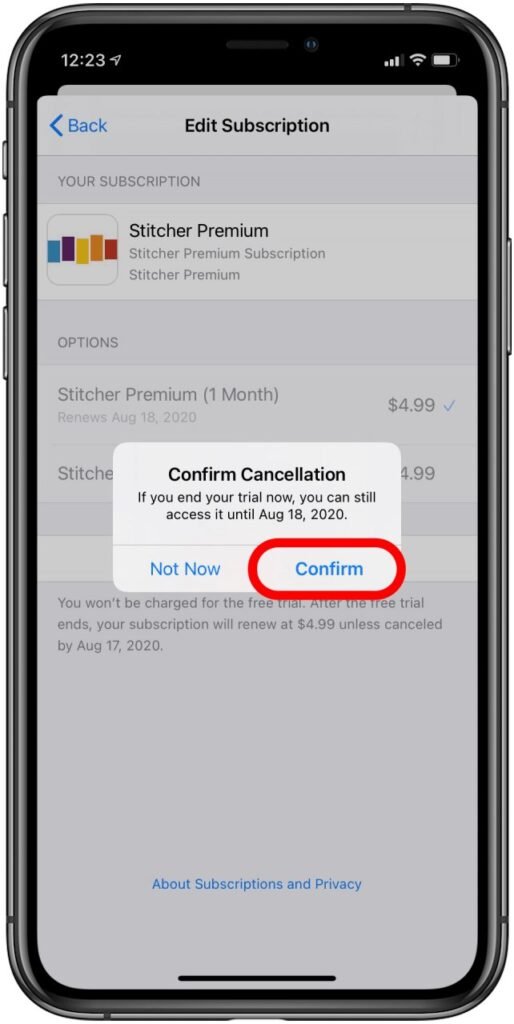
Here’s the method: the moment you start a free trial, immediately go cancel it. Yes, immediately — before you even use the service. On almost every platform (Netflix-style services, apps, subscriptions), canceling during the trial doesn’t end your access — it just stops the auto-renewal, and you keep the full trial period. You get all the free days with zero risk of forgetting.
Where to cancel depends on how you subscribed. Subscribed through the iPhone App Store? Settings > [your name] > Subscriptions — cancel there, not in the app. Through Google Play? Play Store > profile > Payments & subscriptions > Subscriptions. Directly on a website? Account settings > Subscription/Billing — it’s always buried; check the footer links or search the help center for ‘cancel.’ Set a calendar reminder for two days before the trial ends as a backup — belt and suspenders.
The Nuclear Options: Virtual Cards and Reminders
For trials from companies you don’t trust (and let’s be honest, that’s most of them), use a virtual card number. Privacy.com (free) and many banks (Capital One, Citi) let you generate a card number with a spending limit — set it to $1. When the trial tries to charge, it fails, and you get notified. The company can’t charge you, period. Some will email asking for updated payment; ignore it unless you actually want the service.
Alternatively, use a prepaid debit card with a tiny balance for sketchy trials. And keep a simple running list — a phone note titled ‘Trials’ with the service name and end date. It takes ten seconds per signup and has saved me hundreds over the years. Also note: some trials (especially ‘free’ trials that asked for card details upfront) are actually negative-option schemes — if a company makes cancellation genuinely impossible, file a complaint with the FTC and do a chargeback through your card issuer. You have rights here.
Auditing the Damage: Find Trials Already Charging You
If you’re reading this because you just discovered mystery charges, do a full subscription audit right now. iPhone: Settings > [name] > Subscriptions shows everything billed through Apple. Android: Play Store > Subscriptions. For direct website charges, search your email for ‘receipt,’ ‘billing,’ ‘subscription,’ and ‘trial’ — you’ll find charges you forgot. Also scan your bank/credit card statements for recurring charges you don’t recognize.
Cancel everything you’re not actively using — be ruthless; you can always resubscribe. For the ones you keep, note their renewal dates. Going forward, apply the cancel-immediately method to every new trial, and consider whether you even need trials that demand a card upfront — legitimate free trials exist without card requirements, and the card-upfront ones are telling you exactly what their business model is. This same vigilance applies to subscription products that quietly bill monthly.
Quick Answers
- Cancel immediately after signup — you keep the trial period; only the auto-renewal stops.
- iPhone trials: Settings > [your name] > Subscriptions. Android: Play Store > Subscriptions.
- Website trials: Account > Subscription/Billing (buried — check help center for ‘cancel’).
- Virtual cards (Privacy.com, Capital One) with $1 limits make surprise charges impossible.
- Keep a ‘Trials’ note with service names and end dates; set a reminder 2 days before.
- Audit now: check Subscriptions screens + search email for receipts + scan card statements.
- Can’t cancel? FTC complaint + chargeback through your card issuer.
The Bottom Line
To cancel free trials before they charge you: cancel the auto-renewal the moment you sign up (you keep the trial), use virtual cards for untrusted companies, and keep a simple list with end dates. Five minutes of setup beats months of surprise charges.
The subscription economy runs on your forgetfulness — companies literally budget for it. Be the customer who cancels in minute one, audits quarterly, and never pays for a ‘free’ trial again. Your card statement will be blissfully boring, exactly as it should be.
Frequently Asked Questions
Can a company charge me after I cancel a free trial?
If you cancelled properly (confirmation email/screenshot saved) and they charge anyway, that’s an unauthorized charge — dispute it with your card issuer immediately; you’ll win. Keep cancellation confirmations forever (a dedicated email folder). The shady pattern is companies that make cancellation hard, then claim you didn’t cancel — your confirmation is the evidence. Screenshot everything during cancellation, including the final ‘cancelled’ screen with the date.
What if I can’t find the cancel button?
Common dark patterns: the button is buried three menus deep, only available on desktop (not the app), or requires calling/chat. Tricks: search ‘[company] cancel’ on Google — the help article usually reveals the path; check account settings on the website (not the app); look for ‘subscription,’ ‘billing,’ or ‘membership’ sections. If it truly requires a call, call once, get a confirmation number, and follow up in writing. If they won’t let you cancel at all, that’s when the FTC complaint + chargeback path applies — it’s illegal to trap subscribers.
Are free trials without credit cards safe?
Much safer — no card means no surprise charge, period. Legitimate companies offer card-free trials; card-upfront trials are a business model built on forgetfulness. Prefer card-free trials whenever available. When a card is required, that’s your signal to use the cancel-immediately method or a virtual card. The requirement itself is information about the company.
How do I find all my active subscriptions?
iPhone: Settings > [your name] > Subscriptions — the complete Apple-billed list. Android: Play Store > profile > Payments & subscriptions. For direct-billed: search email for ‘receipt,’ ‘renewal,’ ‘billing,’ and ‘subscription’ — then scan bank/card statements for recurring charges you don’t recognize. Do this audit quarterly; the average person finds 2–3 forgotten subscriptions worth $20–$40/month. The CFPB’s guidance on virtual cards is worth reading — they’re the ultimate subscription control tool.
Should I use my main credit card for free trials?
Better: use virtual card numbers (Privacy.com, Capital One, Citi) with $1 limits for trials — surprise charges become technically impossible. Failing that, a separate low-limit card just for trials contains the damage. Never use debit cards for trials: debit lacks the fraud protections credit cards have, and a surprise charge drains actual cash. Keep trial spending off the card you use for real business expenses — see whether a business credit card makes sense for separating business finances properly.