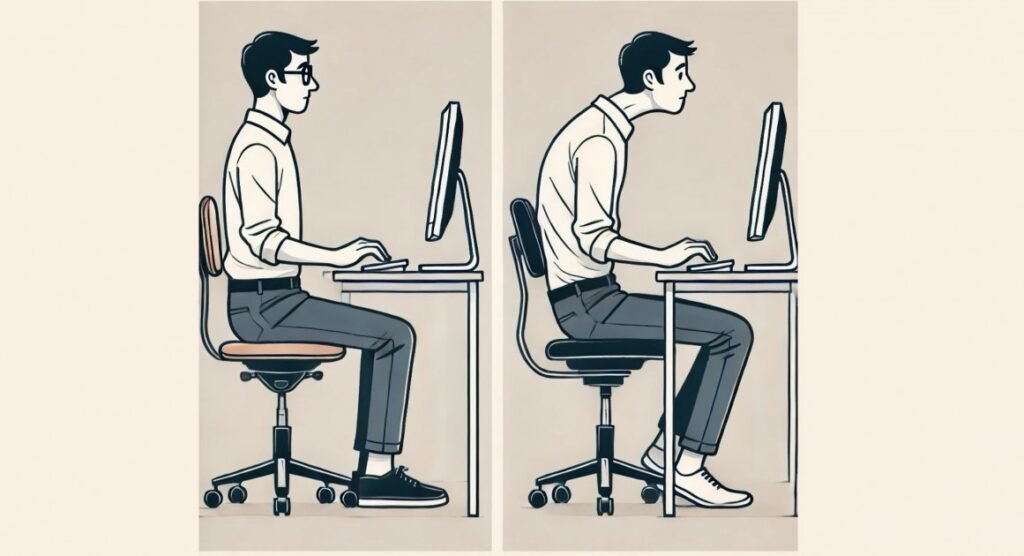
How can I improve my posture while working at a desk
3 PM. Your neck aches. Your shoulders have migrated toward your ears. Your lower back is filing a formal complaint. You’ve been at your desk for six hours, and your body is keeping score. Desk posture isn’t about sitting up straight like a Victorian schoolchild — it’s about setting up your workspace so your body doesn’t have to fight it all day.
The good news: most desk pain comes from a handful of fixable setup problems, not from some fundamental flaw in your spine. Here’s the ergonomic checklist.
How to Fix Your Desk Posture: The Setup
The Chair (Your Foundation)
- Feet flat on the floor (or a footrest), knees at roughly 90°.
- Lower back supported: use the chair’s lumbar support or a rolled towel. Your lumbar spine wants its natural curve — not flattened, not overarched.
- Recline slightly (100–110°) rather than sitting bolt upright — research shows this reduces spinal disc pressure.
- Armrests supporting your arms’ weight, shoulders relaxed — not hunched, not dangling.
Monitor Position (The Neck-Saver)
- Top of screen at or slightly below eye level, about arm’s length away. Looking down at a laptop all day is the #1 cause of “tech neck.”
- Laptop users: this is non-negotiable — get a laptop stand + external keyboard and mouse. A $30 stand fixes what no amount of “sitting up straight” can.
- Dual monitors: primary monitor centered; if split evenly, sit centered between them.
- Reduce glare: position perpendicular to windows; match screen brightness to surroundings.
Keyboard, Mouse, and Arms
- Elbows at ~90°, wrists straight and floating (not resting on the desk edge).
- Mouse close — reaching for it all day strains the shoulder.
- Keep frequently used items within easy reach — repeated reaching and twisting adds up.
Phone Habits
- Stop cradling the phone between ear and shoulder — use speakerphone or a headset.
- Bring the phone up instead of bending your neck down (the “text neck” problem).
The Movement Prescription (More Important Than Posture)
Here’s what ergonomists actually emphasize: the best posture is your next posture. No position held for 8 hours is healthy — including “perfect” posture.
- Stand/move every 30–60 minutes. Set a timer. Walk, stretch, get water.
- The 20-20-20 rule for eyes: every 20 minutes, look at something 20 feet away for 20 seconds.
- Micro-stretches at your desk: chin tucks (counter forward head), doorway chest stretches (counter hunching), seated spinal twists, shoulder rolls.
- Consider a sit-stand desk — alternating is the goal, not standing all day (which has its own problems).
- Walk during calls. The easiest exercise habit in existence.
Fixing Existing Pain
- Neck/upper back: usually monitor height + forward head. Raise the screen, do chin tucks.
- Lower back: lumbar support + recline + getting up regularly. Core and glute strength matter more long-term than any chair.
- Wrist pain: wrist position + break frequency. Persistent numbness/tingling → see a doctor (possible carpal tunnel).
- Headaches: often posture-related — forward head position strains neck muscles. (See when headaches need a doctor.)
- Strengthen, don’t just stretch: rows, face pulls, dead hangs, and core work fix the muscle imbalances that cause desk pain. Stretching alone is temporary.
Ergonomic Upgrades Worth the Money (In Order)
- Laptop stand + external keyboard/mouse ($40–$80) — biggest impact per dollar for laptop users.
- Decent chair ($200–$500) — you spend 2,000 hours/year in it. This is not where to economize.
- Monitor at proper height (stand or arm, $30–$100).
- Footrest ($20–$30) if your feet don’t reach the floor.
- Sit-stand desk ($200–$500) — nice, not essential.
Stretches for Desk Workers (10 Minutes, No Equipment)
Do this sequence once or twice daily — it directly reverses the desk posture:
- Chin tucks (10 reps): pull your chin straight back, making a “double chin.” Holds 5 seconds. The single best exercise for forward head posture.
- Doorway chest stretch (30 sec each side): forearm on a doorframe, step through gently. Opens the chest muscles that hunch you forward.
- Seated spinal twist (30 sec each side): sit tall, rotate right, hold the chair. Reverses the frozen-forward spine.
- Hip flexor stretch (30 sec each side): half-kneeling, push hips forward. Your hip flexors shorten all day in a chair — this is the antidote.
- Dead hangs (20–30 sec): hang from a doorframe pull-up bar if you have one. Decompresses the spine, opens shoulders. Glorious.
- Cat-cow (10 reps): on all fours, alternate arching and rounding your back. Mobilizes the entire spine.
- Shoulder blade squeezes (15 reps): pinch shoulder blades together, hold 5 seconds. Wakes up the muscles that hold you upright.
The Standing Desk Question
- Standing all day isn’t the answer. It trades sitting problems for standing problems (varicose veins, foot pain, lower back fatigue). The research supports alternating, not replacing.
- The ideal ratio: roughly 1:1 to 1:2 standing-to-sitting, changing every 30–60 minutes. Set a timer — you’ll forget otherwise.
- Standing desk setup: monitor at eye level, elbows at 90°, weight shifted (not locked knees), anti-fatigue mat if standing on hard floors.
- Cheaper alternatives: a $30 laptop stand + external keyboard achieves the monitor-height benefit; walking during calls achieves the movement benefit. The desk itself is the least important part.
- Treadmill desks: great for some, distracting for others. Walking at 1–2 mph while doing email works; don’t try to write complex documents while moving.
- The real answer: the best posture is your next posture. Fancy furniture helps, but the timer reminding you to move every 30 minutes helps more.
Quick Note: Ergonomics Standards
For the official workstation setup guidelines — monitor heights, keyboard positions, lighting levels — OSHA’s computer workstation ergonomics guidance is the authoritative reference. And if knee pain is part of your sedentary-worker complaint package, our low-impact knee exercise guide pairs well with the strengthening work mentioned above.
The Bottom Line on Desk Posture
How do you fix your posture at a desk all day? Set up the ergonomics (screen at eye level, lumbar support, elbows at 90°), then move regularly — because no posture survives 8 static hours. The $50 laptop stand matters more than the $500 chair if your screen is currently at chest height. Strengthen your back and core, stretch the chest and hip flexors, and treat movement breaks as non-negotiable. Your 60-year-old self is watching your choices right now — be kind to them.